

Hi Jan,
thanks for reporting the translation issues. They will be addressed with the next release.
For the TabControl you have several options:
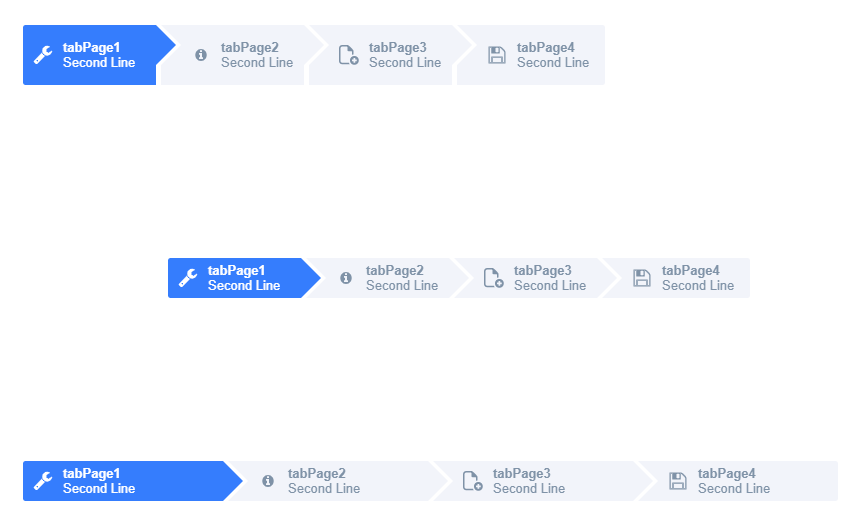
(source code is attached)
2. If you want to keep the header but make it selectable only by code (not by clicking on it) you can use (for each page):
tabPage1.Eval("this.getButton().setEnabled(false)")
3. Finally if you still want to hide the tab control header you have 2 options:
a) Hide it but keep the space reserved for it (keep it in the layout):
this.tabControl1.Eval("this.getChildControl('bar').hide()");
b) Hide it and reuse the space (exclude it from the layout)
this.tabControl1.Eval("this.getChildControl('bar').exclude()");
Best regards
Frank
It’s definitely has been enabled. If case of code error it would be easily reproducible, but the fact that it requires to change focus from the browser tab to something else (not every time though; see initial comment) makes me think that possibly something may prevent the UI from being updated on WiseJ side. Can it be possible? Any ideas on that?
I did the same, referencing precompiled Dll , i can see the library in the Imagesource Editor.
But when i select one library, or also selecting “Theme images” tab, i see image list , but i can’t see thumbnail, nor in the list, neither in the preview box.
It seems to work only for a little set on images in the list.
I am using vs2017 pro, and last version of Wisej
Thank for your attention.
Thank you, it works,
but a have a problem with preview.
The problem appears also when i try to use images in folder, instead of icon pack
No images in the list e no preview in the box after selection .
See attached image
Thanks
Thank you, it works,
but a have a problem with preview.
The problem appears also when i try to use images in folder, instead of icon pack
No images in the list e no preview in the box after selection .
See attached image
Thanks
Looks like you included the ElegantIcon project source and reference the project. Try to reference the precompiled assembly instead. See attached, I simply added a reference to Wisej.Wext.ElegantIcon and opened the button IconSource editor.
The easiest way is to use ActiveReports as you would normally and render the report to a pdf file or stream and assign the stream to pdfViewer.PdfStream. We use it in several large projects with crystal reports, stimulsoft, list & label, reporting services, and others. As a pdf viewer select the Mozilla one (which can also be hosted locally) setting pdfViewer.ViewerType.
Enable all managed exceptions in VS Debug->Windows->ExceptionSettings; ignore the exceptions coming from the system (hit continue) and see if there is an exception when loading your app. If the exception occurs during loading it’s impossible for the server to send any info back to the browser.
HttpContext is not available when using WebSocket. Use Application.User, Application.UserIdentity, Application.UserAgent, Application.UserHostName, etc: https://wisej.com/docs/2.1/html/Properties_T_Wisej_Web_Application.htm
Usually all the information you can possibly get from the client, and the browser is available on Application and Application.Browser (https://wisej.com/docs/2.1/html/T_Wisej_Core_ClientBrowser.htm)
You can also turn on impersonation (which doesn’t work anymore with ASP.NET integrated pipeline) adding impersonate: true to default.json (https://wisej.com/docs/2.1/html/Configuration.htm).
Perfect. Thanks a lot.
Use dt.ToClientTime() or dt.ToClientTime(tzOffset). For the current date use DateTime.Now.ToClientTime(); Wisej, unlike ASP.NET, already handles the time zone difference between the clients and server.
I tried your code after fixing some issues and also tried a new test:
private void userComboBox1_DropDown(object sender, EventArgs e)
{
this.userComboBox1.DropDownHeight = 200;
}
I can set the DrownDownHeight before or after it’s dropped down and it always works.
About the ComboBox performance, the issue was the browser not being able to handle too many elements. Several builds ago we added the VirtualScroll property to the ComboBox, ListBox, and TreeView allowing the to handle unlimited items without any performance loss.
Hi Luca and Frank. Thank you for fixing the Caret/Cursor issue. I see it is working now with the latest version whereby I just need to set the new SelectionStart and SelectionLength.
I haven’t seen any further mention of the other issue, also with regards to the UserComboBox, whereby setting the DropDown height and Width in the DroppedDown event no longer has an effect, and the change is only applied the next time the DropDown is shown. I have tested with the new version and the issue persists.
‘The UserComboBox DropDown event can no longer set the height of the DropDownControl. This worked in version 1 of WiseJ. The height gets set without errors, but only applies the next time the Dropdown is shown(ie the next time the user opens the DropDown, the previous height is then applied). I have tried using an Application.Update but it has not effect. Please see event userComboBox1_DropDown in the attached test case form. I have included a screenshot (UserComboBox issues.PNG) showing the dropdown height unchanged after setting it in the event. It should have changed to 200.With a Custom ComboBox I wrote ages ago, using a UserComboBox and Datagridview(which our system is very dependent on), I have overcome this issue by doing the dropdowncontrol height setting in other places like the logic where comboBox list items are added or removed. This will most likely result in a performance hit, which is precisely the very reason I wrote a Custom control (ie. the standard WiseJ ComboBox in version 1 experienced a serious memory bloat issue with large lists). I am yet to stress test my fix.’
Hi Page,
fixed in Wisej dev build (2.1.76).
Best regards
Frank
Hi Sean,
issue #2301 is fixed in the latest Wisej development build (2.1.76).
Best regards
Frank
Thanks Jan.
this is logged as #2313 and will be fixed in our next Wisej release.
Best regards
Frank
You can register a client side event in Wisej using either the designer (ClientEvents) or by code wither by adding a ClientEvent object or using https://wisej.com/docs/2.1/html/M_Wisej_Web_Control_AddClientEventListener.htm.
When you build the script you can change the values.
But you can also do this in a normal VB.NET click handler using:
Application.Navigate(“mailto:….”);
Embed an aspx in the assembly?
You could but it’s a bit difficult and may create other issues with ASP.NET.
You’d have to register a VirtualPathProvider (https://docs.microsoft.com/en-us/dotnet/api/system.web.hosting.virtualpathprovider?view=netframework-4.8) and a VirtualFile.
We have done it for the AspNetControl, you can get the source code here: https://github.com/iceteagroup/wisej-extensions/blob/2.1/Wisej.Web.Ext.AspNetControl/HttpModule.cs
HTH, but this is beyond the Wisej scope.
For all who are curious,
Here is a small sample demonstrating how you can use Google Map’s Polyline to draw a route in Wisej.
You’ll need to use the Directions API (https://developers.google.com/maps/documentation/directions/start) to generate the encoded Polyline.
Once you have the encoded Polyline, you need to decode it and put it into a new google.maps.Polyline instance and add it to the map (see the sample).
Let me know if you have any questions about it!
Best regards,
Levie