

I do not know why I cannot get this to work in wisej 2.1
I have a form with two textboxs and a button on it and the following code does not work for me.
private void button1_Click(object sender, EventArgs e)
{
this.styleExtender1.SetStyle(this.textBox1, new { border = “5px solid blue” });
this.styleExtender1.SetStyle(this.textBox2, new { borderWidth = “15px”});
}
I also came across cssstyle property for controls in my Wisej2 environment. which one is the recommended way ?
Hi Adrian,
Thanks for reporting. It’s a bug! I’ve logged it as #2324 and a fix will be available in the next build!
Best,
Levie
The exception is coming from the server but the stackTrace is “” because it’s not in debug mode. If you enable debug mode in web.config you will get the stack trace. Can you send that to me please?
Claudio.
Thanks for your comment
Happy to be been helpful to you.
Regards and happy coding 😉
Paul C.
Wisej is plain .NET so there is nothing special with an obfuscator compatibility.
At the moment it’s not possible because of the virtual scrolling implementation. We may be able to add it after the 2.2 release, I can log an enhancement request.
I’ve done some code changes that could help to resolve the issue., will need to do more comprehensive testing to ensure the issue is actually resolved. I will keep this thread updated with results
Update: ignore it, the issue still could be reproduced 🙁
Really looking forward to your release of Wisej 3 .NET Core, It’s mentioned that it is dependent on Microsoft’s release of .NET 5, ETA ~Nov 2020. Nice Xmas gift?
It is great to hear that wisej3 is being worked on in posts, keep up the good work. 🙂 Sorry about the large font issues in the previous post, cannot edit it 🙁 ?
- WiseJ running on Raspberry Pi ?
To update this issue. We have Wisej 3 .NET Core running perfectly well in a Raspberry Pi 4. Luca (ITG) answered Jun 18, 2020 – 12:22 am- Any plans for cross platform support such as Linux, Mac and mobile platforms such as Android, iOS, Smart TV applications support ?
To update this thread:
– We have now Wisej running on Linux and MacOS (it’s 3.0 and it’s on schedule)
– Wisej is also running on a Raspberry Pi 4 with 4GB and plenty of memory to spare! Luca (ITG) answered Jun 12, 2020 – 10:00 pm
Hi Anz,
You should be able to. You can test it by calling myControl.BringToFront(); The MDI Host is shown on top of the control by default, but you can’t tell because it’s transparent.
Check out this example for adding controls around the MDI Window: https://github.com/iceteagroup/wisej-examples/tree/2.0/MDIExample/MDIExample It shows a Toolbar at the top of the MDI host form.
If you need a common control on all of your MDI child controls (such as a toolbar) I would suggest creating a custom Form with the button and to subclass your other windows from that.
Let me know if you have any questions about it!
Best regards,
Levie
Hi Levie (ITG) ,
I use Application.CommonAppDataRegistry.SetValue(“Testing”, “True”). It is denied
How to use “HKEY_CURRENT_USER\Software” in Wisej app?
Thank you.
Hi Huỳnh,
You can also access a registry specific for your Wisej application using something like this:
Application.CommonAppDataRegistry.SetValue(“Test”, “12345”)
It’s saved under (in your case) \HKEY_LOCAL_MACHINE\SOFTWARE\WisejWeb\1.0.0.0.
Best,
Levie
Hi Huỳnh,
This isn’t a Wisej issue, but the issue occurs because it’s not reading from where you think it is.
When you try reading from the Registry under that ApplicationPool it’s actually reading from a specific profile in HKEY_USERS.
Try writing to the registry first and then search under HKEY_USERS for the created registry entry.
It will be a path similar to the screenshot I attached!
Best regards,
Levie
Small update (see previous comment first):
Not sure if it helps, but when I stopped in Chrome debug on that error I can also see some Wisej internal process response object. See screenshot attached and if needed more expanded view of this processRepose in txt file (inside zip)
Yeah, it happens in Chrome with both IIS express (in debug) or IIS and in both debug and release environments. Locally and on deployment server (which use IIS to serve the app). WiseJ version used – 2.1.75
– I can’t see any/catch any exceptions, neither nothing related in Event Viewer (any severe errors would be seen there).
– I would exclude assembly loading error as by logging I can see that controls are loaded fine, load event are fired, it even happens on our auto-login – I can see by logs that auto-login processed fine in the code. So it overcomes loading stage it seems.
– As for “In VS look at the View->Output-Debug”, just tried – when it reproduced Output-Debug is totally empty, not a single line there! (and obviously tons of them when it’s loaded fine).
BUT I’ve just added Wisej.onException event with simple console.log(..) and error started to appear there (see attached screenshot): {message: “Cannot perform runtime binding on a null reference”, stackTrace: “”, exception: “Microsoft.CSharp.RuntimeBinder.RuntimeBinderException”, invalidSession: false}
Do you have any ideas how to find the source of such a null reference error?
It was the plan a while ago but we are not doing that anymore. The mobile controls are based on a different overall architecture and would have required a different framework. Instead we are making the existing controls more mobile friendly and may add specific mobile controls (like a wheel) in the future.
Additionally, now Wisej is able to interact with the native iOS and Android devices for:
ThouchID, FaceID, NFC, Haptic feedback, Push notifications, Native alerts, Native Toolbar, Status Bar, Native Tabbar, Screen locking, Brightness, Multiple screens, and more.
Thanks, it’s a bug or a regression. Will log.
Additionally, the CellBeginEdit and CellEndEdit events for a DataGridViewCheckBoxCell (or any cell without an editor) work differently in Wisej from WinForms:
A a workaround you can use CellValueChanged.
Issue #2319 https://wisej.com/issues/
When the exceptions are enabled (and Enable Just My Code is off in tools->options, which is the default usually) VS breaks on handled internal exceptions too. At the start you should get a few initial permission exceptions, loading exceptions, etc. If there is an internal exception that causes the blank screen it would break in VS.
Other things to try:
I tried the scenario you mentioned but cannot reproduce. The fact that the appear event is not fired is normal since the widgets are not created on the client. If the widgets are not created it must be because the response was not received, which you can see in the Network tab. Try also to disable WebSocket in default.json.
Let me know.
Hi Anz,
yes, it´s possible, see screenshot:
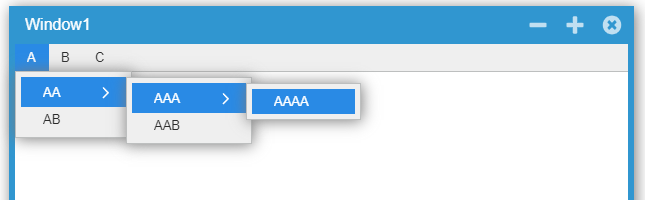
Just make sure to edit the MenuItems properties of each MenuItem.
Best regards
Frank
Any updates on that?