Hi Luca,
yes good idea! I hadn’t thought about the possibility of using two datagridviews.
I saw that this is a request made by other users a time ago, If you can send the sample I thank you so much.
thank you!
Cristian
Takao,
we have just uploaded a new Wisej beta release (2.2.4) that fixes this issue.
Best regards
Frank
Hi,
What version of Wisej are you using? Is your IntelliSense working correctly?
If you create a new blank project and add a ListView / Item the property should show up fine.
Let me know!
Best,
Levie
OK.
Wait for the next release.
It’s not available yet. Try the attached sample (Wisej.PWA.zip). I’m not sure if it needs a new beta update.
When you run the app you will get this:

Notice the little (+) sign in the address bar. That is chrome’s only notification that you can install the app. Wisej provides a new property Application.CanInstallPWA which lets your app show whatever message you like to the user.
The sample displays the nice bottom panel you see in the screenshot. You can either click the (+) sign on the address bar or click the Install button. When you click the install button the only thing you can do is have a client side event that calls “Wisej.showPWAPrompt()”. That will make the browser show the prompt as if the user clicked the (+) icon.
If the user installs the app it switches to this:

The color of the caption and the icon can be changed in manifest.json. PWA configuration is very picky. Anything wrong and it will fail. You can check using Chrome F12 -> Application -> Workers and Manifest. It will show whatever it is it didn’t like.
After the app is installed, users can run it from their desktop as a desktop app. It will also preload the wisej libraries and cache locally anything it finds in /Offline. If you run the app without a connection you get this:

See the different prebuilt Offline-1 to -7. Of course you can put instead anything you like in /Offline. You can put an entire javascript application in there.
Kubernetes is not a container and not an OS. You can run wisej apps in any container on Windows (i.e docker) very easily and even directly from visual studio, including live debugging, just like any .NET app.
Didn’t think of that 🙂
It may be possible to enhance the Upload control with a BeforeUpload or Uploading cancelable event that would allows an app to receive the names of the files before they are uploaded. I’ll get back to you, could be a derived class or maybe an enhancement in Wisej. Logged as enhancement #2396.
The editor is not shown until the cell is in edit mode. You can initiate edit mode by typing, double clicking or entering the cell, see the EditMode property.
https://wisej.com/docs/2.1/html/P_Wisej_Web_DataGridView_EditMode.htm
https://stackoverflow.com/questions/1814423/datagridview-how-to-set-a-cell-in-editing-mode
Thanks, I think I can reproduce. Looks like you are assigning cells of different types to the row cells, which is a OK and a great use of the grid. This is most likely a regression caused by the #2349 “DataGridView.InheritedCellStyle loses the inherited NullValue and defaults to “”.” fix (https://wisej.com/issues).
The issue is the enumeration because of the new row virtual system. It will be fixed in the next beta update. You can try this:
for (var i = 0; i < this.dataGridView1.RowCount; i++)
{
  var wDataRow = this.dataGridView1.Rows[i];
  System.Console.Write(wDataRow.Cells["Subject"].Value);
}
Additionally note that requesting a DataGridViewRow through this.dataGridView1.Rows[i] or the enumeration (when fixed) it will cause the virtual row to become real (to be created). A better way is to use this.dataGridView1.GetValue() and this.dataGridView1.SetValue(); these methods don’t force the creation of the DataGridViewRow.
Hi Christian, one way is to use the ColumnFilter extension, but we also have an internal system of binding 2 grids. You know that a DataGridView is also a container and you can drop and dock controls inside to create a composite grid?
It lets you create a grid with a child grid (even more than one) and use the second grid as a summary or header. The problem is keeping the columns and scrolling in sync. Which is implemented internally for another framework based on Wisej. I’ll see if some of that code can be copied into the wisej.web.DataGrid.js widget and then I can send you a simple demo. For now enjoy the screenshot, shows a grid with a summary grid and another with a header grid. The size of the child grid is also resizable.
Do you mean inertia scrolling when swiping up/down?
It has been improved a lot since several 2.1 builds ago and we added PrefetchItems (https://wisej.com/docs/2.1/search.html?SearchText=prefetchitems) to all controls with the VirtualScroll property (https://wisej.com/docs/2.1/search.html?SearchText=virtualscroll). Touch support mixed with pinch and zooming has also been improved a lot.
See a video through the airserver screen mirroring of a data repeater with virtually unlimited items on my phone:
https://drive.google.com/file/d/1pAFBgkWa-7SGCsoKIyul9kq8EgwIETL-/view?usp=sharing
DataRepeater and ListView always use virtual scrolling, ListBox, ComboBox, TreeView can use VirtualScrolling optionally, the DataGridView always uses virtual scrolling, all containers never use virtual scrolling. All controls without virtual scrolling are always smooth and always support inertia scrolling perfectly well.
When virtual scrolling is enabled, the items outside of view do not exist and need to be created as the device scrolls. It allows for the support of unlimited items but it cause choppy scrolling. When PrefetchItems is set, Wisej preloads the items outside of view (see video) supporting inertia and smooth scrolling together with unlimited items.
The only control that supports inertia scrolling but it’s still “choppy” for vertical scrolling (not columns horizontal scrolling) is the DataGridView because while it’s fully virtual it cannot prefetch items at this time. However it still supports inertia scrolling.
HTH
The github repos with the projects are not public yet. The integration projects will be provided with source code. To add them to the toolbox follow the normal VS toolbox features. One way is to create a new tab and drag and drop the assembly.
Hi Luca,
yes I just use a hidden upload control by a Button, but how I can get the name of the selected files, before upload them?
is this possibile?
bye
You can’t do it using the Upload control directly since it uploads the file first, it’s just the way it works. But you can use a hidden Upload control and click your button, check the file, and then call upload1.UploadFiles(); It will trigger the client upload.
Looks like you have a white fore color on white background. Can you post the code?
Hi guys.
With the help of the icons8.com support team, I was able to make it work. Just had to edit the .svg file and get rid of any “fill” entries in it. In case of them all being black, they will look like fill=”#000000″. So, after deleting them all, my icons with overlays started coloring just fine according to the application theme selected.
Cheers.
Ivan
Thanks Luca,
Your help is appreciated as always. I’ll take a look at the samples and see if I can get my head round the workflow. Also looking forward to purchasing a new subscription to WiseJ and seeing the improvements you have made over the last 18 months.
Thanks again
Nic
Hi Levie,
I explain myself better.
if I upload files with the Upload control, it starts uploading immediately after the OK, is that right?
Is there any way to know if the file on the server exists, but before starting the file upload.
it would be useful for example to ask to overwrite the file without waiting for the whole upload
best
Cristian
Hi Neil,
You can use
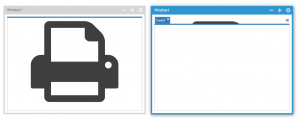
this.MdiClient.BackgroundImage or this.MdiClient.BackgroundImageSource
But please keep in mind, that the MDI Client includes the tabbed control so it´s probably best to leave some space at the top of the image.
Otherwise it will show through the tab control.
You can try with
this.MdiClient.BackgroundImageSource = "icon-print".
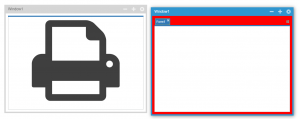
Or you can also set the background color of the tab control to “hide” the image part:
this.MdiClient.TabControl.BackColor = System.Drawing.Color.Red;
Hope that helps.
Best regards
Frank