

Hi Luca.
Thank you for the prompt reply.
Yep, I thought that would be the case and I would have to deal with Modal forms and set the outsiders properly. It won’t be a big deal, since I will do it all from a Base form, which will handle tasks like that for the whole application. I just wondered whether there would be a magic move from the framework for something like that.
Since I don’t want forms on top of the NavigationBar and MenuBar, I will keep my current design and follow your second advice.
Once again. thanks.
Ivan
Hi Ivan,
this issue is logged as #2433 and we´ll inform you when a fix is available.
Best regards
Frank
Please see attached sample application, I have not tried iOS I only have android device(s).
Thanks.
The error is 403 ModSecurityAction. See attached. The server is refusing the ajax requests.
Hi Levie,
Thank you for your support. The application was working (autoweb.alb-soft.com is the site and you can check the error there) and the hosting team did a migration and after that, I got this error.
Maybe it is a DNS problem because when I test on my laptop I do not get this error. I wrote to the support team for hosting and I will come back to you.
Best Regards
Hakik
Hi Dino,
Just wanted to let you know, we’re exploring the idea of a Google Analytics extension for Wisej. It might be some time before it’s ready to be released, but you should be able to find some info on monitoring SPA Frameworks here:
https://developers.google.com/analytics/devguides/collection/analyticsjs/single-page-applications
Please let me know if you have any questions!
HTH,
Levie
Hi Glenn,
Could you please attach a small video and sample to demonstrate the issue? The PWA template doesn’t affect this aspect of the mobile application.
You might need to add a bit of CSS to get your desired behavior, here’s a starting point:
https://stackoverflow.com/questions/14384847/android-html5-soft-keyboard-overlaps-input-field
The same issue doesn’t occur on iOS?
Let me know!
Best,
Levie
Hi Hakik,
the issue occurs when the Wisej application running on the client’s browser can’t connect to the server application. It would help if you could attach a video and a small sample to demonstrate the issue.
Please check the developer console in Chrome for any issues and ensure that you have a solid internet connection. If both of these things are fine, try to create a new blank project and slowly start adding features from your other project. See if you can find what’s causing the issue that way. Make sure to take note of anything that triggers the issue.
HTH,
Levie
Hi Takao,
When you download Wisej 2.2 from wisej.com/Builds or the AutoUpdater, you will have access to the new Wisej PWA Template.
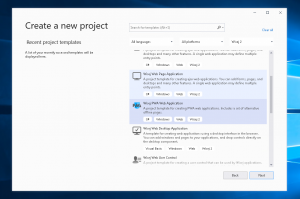
Once you create the new project, you’ll see the structure of the project is a bit different compared to other Wisej solutions.
You’ll see there are now 8 different unique offline page styles you can choose from. Look at each one and pick the one you like the most. Remove the rest of the Offline folders from the project and rename your favorite offline style to just “Offline”
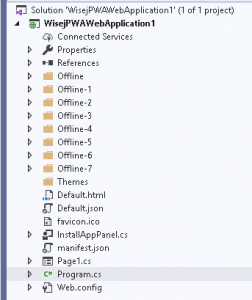
You’ll see this project comes with a default PWA installation panel that you can customize.
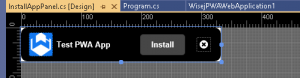
The default application will show the custom PWA installation prompt as soon as it’s available to install (Application_BeforeInstallPrompt event)
which correlates to the JS event: https://web.dev/customize-install/
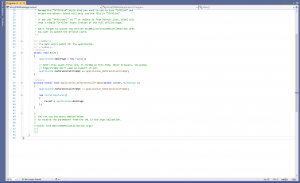
You can find new configuration options in Default.json as well, note the “enablePWA” and “offlineUrl” configuration options.
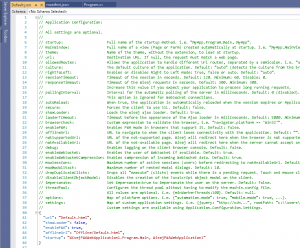
The template also comes with the standard manifest.json configuration file for PWAs. You can find documentation on it here: https://developer.mozilla.org/en-US/docs/Web/Manifest
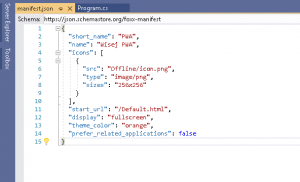
If you have any questions about the integration please let me know! I’ve attached the sample project from the screenshots.
Best regards,
Levie
Hi Levie(ITG) ,
unfortunately the sorting does not work in version 2.2.11 🙁
Hi Cristian,
sorry, please use 2.2.12, there was a problem in the deployment of 2.2.11
Best regards
Frank
Hi Ewan,
please use 2.2.12 that has just been uploaded.
Best regards
Frank
Completely uninstalling Wise J and reinstalling fixed the problem
Hi Edmond,
You should be able to use any .NET obfuscator you want. There aren’t any special requirements!
HTH,
Levie
Hi Harald
Thanks for the description to reproduce the case
The situation is reproduced but when the server resume, the application in the second browser resume the operation
This was tested with last preview 2.2.10
Video with test
https://drive.google.com/file/d/1G0hd5rjDUNWVuchIjkliE4n2JowXp_lR/view?usp=sharing
This new version will be soon available.
Regards and happy coding
Hi.
Not sure it is the best solution, but I managed to make it work dealing with the Window FormClosing and the Animation End events.
        private bool _ClosingWindowAnimationHasPlayed = false;

        private void MyWindow_FormClosing(object sender, FormClosingEventArgs e)
        {
            if (_ClosingWindowAnimationHasPlayed == false)
            {
                e.Cancel = true;
                this.animation2.Run(this);
            }
        }

        private void animation2_End(object sender, AnimationEventArgs e)
        {
            _ClosingWindowAnimationHasPlayed = true;
            this.animation2.ResetAnimation(this);
            this.Close();
        }
this problem occurs regardless of the code …
I have tried the following on the development machine:
The other browser stayed open and showed the offline icon.
I’ve never seen this before, so it obviously shows that the server is no longer accessible, that’s okay.
As long as the server is offline, the browser application shows the offline icon and is frozen. As soon as the server is online again, you can continue working in the browser application, but unfortunately the offline icon remains … that’s not okay.
Could You please post a sample project where this issue occurs ?
I have tested with last version of IE and Chrome and couldn’t reproduce
Thanks in advance
This is the solution: SANS-SERIF does not work, I set it back to @default, since then everything works fine with AutoSize=true
And I also tried to remove the <style …> workaround in the default.html … and that works too … only the wrong font was the reason for this behaviour..
Thank you!!!
If I select more than one label in the designer at the same time and click “….” in the font property and select bold THEN all selected labels are automatically set to Microsoft SANS SERIF font