

This is the sample
Best,
Kevin(ITG)
Hi Neil,
Can you send us an sample so that we can have a better view of the problem?
And which version of Wisej are you using?
Best,
Kevin (ITG)
Hi Nicky
I cant upload a sample here…
This is a link to a complete Sample that is similar to what I use (14Mb – Size is due to inclusion of Crystal Report Viewer javascript & activeX):
https://www.klevaworx.com/CrystalReportSample/CrystalReportSample.zip
Regards
Kevin
Hi dev
All new features and fixes are now focused our Wisej.net 3.0 release
available on download page and nuget
For Wisej 2.5, latest stable release is available only from nuget, 2.5.36
If after update, you has any isse. Please atach a smallest runable sample that show it, thanks
HTH
regards
Hi dev
Thanks for write us
There are an issue detected and fixed for this topic
Now is in testing and will be available in our next release
thanks for write us
Hi Nicolas
In this support post you can find details about the same question
Also here you can see the documentation about it
Regards
To update this thread, I think I see the source of the confusion. Property changes events fire when the property changes. In the case of TextChanged it is not directly related to tabbing out of the control. The text is considered changed the moment the user types in the textbox – as it should because the user could click on a button that doesn’t take the focus away, or there can be a timer, or a keyboard accelerator, etc.
As soon as there is an event of any kind that is fired to the server, Wisej updates the state of all controls – as it should since an event of any control expects to find the correct value on any other control.
In this case, when attaching the ModifiedChanged event, Wisej fires it the moment the user modifies the text in the TextBox (by design and as required by most apps to enable save buttons, for example). However, since this event fires all the times the user types (as if it was a KeyDown handler) it also causes the TextChanged event to fire. Which is technically correct but can be confusing. It is the identical behavior as if KeyDown was attached.
The only improvement I can see here is not to fire ModifiedChanged from the client after the first time it’s fired and until the text is reset. I will log as an enhancement request.
Hi Nicholas,
you can use the following workaround code to fix that behavior.
private void dataGridView1_ColumnWidthChanged(object sender, DataGridViewColumnEventArgs e)
{
  this.dataGridView1.AutoResizeRows();
}
We´ll investigate to see if we can fix it generally.
Best regards
Frank
Hi Luca,
I attached a video of me using the TextChanged Event which fires when tabbing but not before. You can see all the code in the video.
ModifiedChanged fires on KeyDown.
Greetings
edit: added the small project as a zip as well.
I have set the Autosize to false, rebuilt the application and run it several times on both production and test and the issue remains the same.
The link below points to a sample project with the same datagridview i am using:
https://drive.google.com/file/d/1AufUAri6mWblQUvLHOPkBPc5fKY7oyA1/view?usp=sharing
You would realise that at design time the grid works as expected (both columns resize as the form resizes) but when it is run one the last column resizes upon form resizing.
NB: Before posting anything here i must have tried resolving it at my end in any possible way without success (I have been trying to fix this particular one for 2 days now) and the documentation points to nothing on datagridview columns resizing that could help me solve the issue, so far as i can see.
Thanks
Hi hasan,
Wisej 3 uses Aspnet core, we have a Startup.cs, the configuration can be made here.
Just check the OKTA requirements. If you need professional services, you can go to http://docs.wisej.com/license for more details.
Best,
Kevin(ITG)
It’s easy to implement with Wisej.
This is a rough example that you need to adapt to your requirements in terms of format, filter, etc. I would create a derived class and manage it there:
this.textBox1.Filter = "[\\d,\\.]";

private void textBox1_Leave(object sender, System.EventArgs e)
{
  if (Decimal.TryParse(this.textBox1.Text, out decimal value))
     this.textBox1.Text = value.ToString("n");
}
Filter is a regular expression filter (see regexp documentation). For the formatting refer to .NET formatting guide.
In some implementations I have seen apps that remove the formatting in the Enter event. It’s a matter of requirements.
Hi Sascha
Thanks for write us
The way how its work is the following
When ModifiedChanged is attached to an handler (lazy event) it is fired immediately when typing for both TextBox and DateTimePicker (works the same way and it’s by design).
When ModifiedChanged is not attached, it’s not fired immediately (because of the lazy event system) but OnModifiedChanged is invoked when there is an event back from the browser.
The Modified property is automatically reset when assigning the Text property even with the same value.
Both work the same way,
Hope to be helpful
Hi Nicky..
That’s how I did it, I hope it helps you…
nValor = Convert.ToDecimal(txtTotal.Text.ToString());
txtTotal.Text = nValor.ToString(“#,##0.00”);
Regards
JC
Hi Nicky,
did you try using a MaskedTextBox ?
It should help you achieve what you want.
Best regards
Frank
Hi Sascha,
this issue is fixed in the latest Wisej release (3.0.9).
Best regards
Frank
Hi Nicholas,
It appears that you’ve set the DataGridView’s AutoSize property to true, since it autosizes the whole DataGrid, it prevents it from resizing to fit the content.
I would suggest that you set the property to False, that should fix the issue. If it’s not the case then please provide us with a sample to investigate.
I would also suggest that you take a look at our documentation here: Documentation | Wisej
We have a plethora of information and examples that would certainly help you on your journey!
HTH,
Alaa
Hi Serkan,
a generic approach like the one you suggested is not possible.
You have to apply CSS to the child widget.
This can either be done with a javascript call/eval see here
https://docs.wisej.com/docs/concepts/javascript
or in InitScript to have it persistently.
The call could look like this (depending on the control you´re using it for):
this.getChildControl("icon").getContentElemenet().setStyle(...)
Hope this helps.
Best regards
Frank
Hi Paul,
I’ve upgraded my project to use Wisej 2.2 and the problem has gone.
Thanks
Angelo,
one simple way to achieve this is to iterate through the NavigationBarItems and change the size:
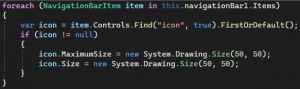
Best regards
Frank