

You can use aspnet core service container seamlessly in your code. The scope is whatever aspnet core supports. There is no concept of session though. Transient means that it’s recreated on every request.
Our service container supports sessions, singleton, and transient.
We are not merging our container with aspnet core’s container. Apps can use any service container they prefer, a popular is autofac, for example, but there are others as well.
When you replace an assembly the web server restarts. It’s not our web server and there is no way around it.
There are several ways to “gracefully” kick out users but they are all part of the application’s architecture and outside of Wisej’s scope.
Hi Frank,
Sent you a zipped test case on your email.
Alex
hi Alexander
We have done various checks for the two issues that you comment us, but both issues isn’t occurs.
Here I let you the sample that I used with mixin theme
I use the latest versions of browsers Edge, Chrome and FF and wisej.net 3.0.11
We appreciate if can compare with your test and comment us
Regards
Paul
Hi Alex,
We’re currently investigating and trying to reproduce the issue, we’ll get back to you ASAP!
To fix the “OutOfProcess” issue, you can check out Microsoft Docs for more info!
Best,
Alaa
Hi Nicolas
Wisej kind of supports horizontal ListBox like tihs
in listBox1.InitScript you can use:
this.setOrientation(“horizontal”);
this.setScrollbarX(“on”);
by the way, your sample image doesn’t show an horizontal listbox it shows a flowlayout.
Regards
Hi Nicholas,
Please update the InitScript code by adding the following:
var content = this.__content;

content.getLayout().dispose();

content.setLayout(new qx.ui.layout.Flow);
Also, we will be adding a Layout property to the ListBox in Wisej 3.1!
HTH,
Alaa
Thanks Frank for the directive. But I had wanted to display 2, 3 or 4 rows for the items that flows from right to left. The result for the above code displays only one row for the items, which is not the desired result as can be seen from my first attachment. Is there anyway to fix that pls?
Hi Frank, hope you are well. To answer your questions:
3.0.6
No, it does not show up in emulation.
Yes, I have hidden columns. I removed them, but the problem is stil there
I’ll see if I can create a test case.
Best regards
Alex
Hi Alex,
what Wisej version are you using here?
Can you reproduce it on with a device emulation or only on the real mobile device?
Do you use hidden columns?
Any chance to send us some sort of a test case?
Best regards
Frank
Nicholas,
the code that Paul posted is in JavaScript and can be added using the editor for the InitScript Property:
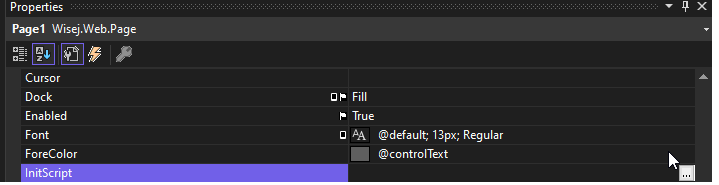
See also:
https://docs.wisej.com/docs/controls/general/common-properties#initscript
Best regards
Frank
Hi Ruben,
Chances are that the GC is kicking in, if the same image instance is used by another PictureBox or the images themselves are static and either a Session or the PictureBox itself is disposed then all references to that image is also disposed.
Can you please wrap up a small runnable sample that showcases how you actually load these images in your application?
Best,
Alaa
//
Hi Shady
Please, can you attach a small runnable sample project that reproduce what your comment us
Thanks
Hi Onur,
Without a runnable sample, the general process is to attach to the event on the client and use one of the below methods to communicate data back to the server.
You can find information and examples for sending data back to the server from the client here:
https://docs.wisej.com/api/wisej.web/content/widget#initscript
https://docs.wisej.com/docs/concepts/javascript-object-model
If you need additional help, we offer several training packages to get you started: https://wisej.com/services-packages/.
HTH,
Levie
In any case you should be able to resolve this with Conditional References. See here
https://markheath.net/post/csproj-conditional-references
Regards
Frank
Hi Alex,
I hope you´re doing fine!
Can you please give me an example for a reference you´d like to add?
TIA
Frank
Hi.
According first issue: You can simply create Wisej Desktop Application from template, add new Mixin Theme item to project, uncomment mixin statements (red button background). Then you need to remove:
<ItemGroup>
<EmbeddedResource Include=”Themes\YOUR_NAME.mixin.theme” />
</ItemGroup>
from csproj file (for some reason you do not want to embed your custom mixin or theme into assembly resources). Then build and start your app for modern .NET profile (using standalone built Kesterl exe loader or using VS debugger). You can see that it is not loading mixin from “Themes” subdir. If you will then start it using NF 4.8 and IIS Express (using VS debugger f.e.), it will successfully load mixin as file from “Themes” directory and show red background on buttons.
According second issue: You can start your app for modern .NET profile (using standalone Kesterl or using VS debugger) and then, when application starts, do not wait and QUICKLY switch to browser window where your tab with “http://localhost:5000” is opened, try to refresh it, etc… ~2 of 10 trials you will get default Blue-1 theme fallback loaded instead of f.e. Bootstrap one. The worst thing is that when you trigger this bug, fallback theme will be loaded for every new session (user) in running app, until you completely reload app and it will load correctly for first time.
Hi Mike,
we´re sorry to see that happen. Can you please contact us at supportATwisej.com and send your license key and also the Wisej version you´re using?
Thanks in advance!
Best regards
Frank
Hi Nicholas,
You can change the Application’s name from the mainfest.json file.
HTH,
Alaa
Hi Nicholas,
You’ll have to handle the Application.SessionTimeout event, like so:
Application.SessionTimeout += Application_SessionTimeout;

private static void Application_SessionTimeout(object sender, System.ComponentModel.HandledEventArgs e)

{

e.Handled = true;

}
Note that these lines of code are meant to be placed inside your Program.cs file.
HTH,
Alaa