

Hi Davide,
Implementing such a feature would be rather hard in a browser.
You can theoretically use the ClientFileSystem extension to make it easier and have the browser load files from your client’s File System.
But, everything would be handeled on the Server side, that means that everything would be uploaded regardless and you’ll have to compare your hash checksums on the server.
That would be expensive in terms of resources.
You can also try to use javascript for the Client side operations, but that would require calculating the Checksum as chunks otherwise the browser would crash if the file is too big.
If you need additional help with this issue, you can check out our Professional Service Packages!
HTH,
Alaa
//
Hi Davide,
Unfortunately, we couldn’t reproduce the issue!
Can you wrap up a sample and send it here?
Thanks!
Alaa
//
Hi Ewan
Did you try adding roles to allow your users to connect to your app?
The configuration you did would deny any access to your application, you should atleast define certain roles for your users to allow them to connect.
For more info, you can head over to Microsoft’s Documentation | Authorization for more details.
As for the difference between Application.User and Application.UserIdentity is the following:
The User property simply gives you “security” information, such as the user’s SID.
The UserIdentity however would return the WindowsIdentity type related to the user currently connected to the client.
You can read about them over at Microsoft’s Documentations: WindowsIdentity Class – IPrincipal Interface
HTH,
Alaa
//
Hi Ewan,
You can contact the sales team at Sales AT Wisej.com.
Best,
Alaa
Hi Emiliano,
Can you elaborate on what’s the “top bar” you’re referring to?
It’s not really advised to use querySelector with Wisej.NET applications unless you have a specific way of identifying your widget. (i.e. something like a CSS Class name you made)
What you’re looking for is a child control, but without knowing which control you’re trying to modify it’s hard to guess!
Thanks,
Alaa
Hi Sascha,
You can have your own javascript functions in your Wisej.NET’s application and you can then later call them from your WinForms app.
This can be done either directly from your Default.html page (i.e. you write your scripts there), or you can add a js to your project’s “Platform” folder.
If you go with the latter, you should uncomment the line // [assembly: Wisej.Core.WisejResources(ExcludeList: "")] in your AssemblyInfo.cs file so that your .js files are actually embedded and loaded into the application.
Other than that, using WebMethods is also fine!
HTH,
Alaa
My take on this would be to set AutoCompleteMode to AppendFilter and add a InitScript to have the filtering.
Cheers, Gerhard
Thanks Kizaemon,
with your detailed description I could reproduce it.
We´ll fix that issue and I´ll let you know when it passed QA and is included in a next Wisej.NET release.
Best regards
Frank
Hi,
As requested, I have created a project containing only one subscriber to redis messages.
docker run -p 6379:6379 --name redis-master -e REDIS_REPLICATION_MODE=master -e ALLOW_EMPTY_PASSWORD=yes bitnami/redis:latest
PUBLISH messages "My Message"
It must display “1” and stop at the break point, in the variable “value” will be the message.
Proceeding however the “Toast” will not display the message
Thank you for your help
Screen recording of steps to reproduce.
1) Bind collection A (with 3 items)
2) Select the third item (Antigua)
3) Bind collection B (with 2 items)
4) Select the first item (Zambia)
Hi Davide.
We have logged this issue as an enhancement request.
If you would like a workaround, please contact us at support AT wisej.com .
Best,
Alaa
Hi Tiziano,
Would you be able to wrap up a small sample for us to see what’s wrong?
We can’t just rely on code snippets, we need to have a small, runnable sample for us to quickly help you out!
Thank you,
Alaa
Thanks Neil (and Jesus for initially reporting that issue),
a fix is currently in QA and will be included in the next release.
We´ll keep you updated.
Best regards
Frank
Hello Frank,
We are also seeing this behavior.
In case it helps your investigation, I can add that we are seeing:
Regards,
Neil
Hi Kizaemon,
thanks for following up on this.
I have tried your test case with our latest internal build and could not reproduce it.
Can you please tell me which Wisej version you are using that shows the issue you described?
Thanks in advance!
Best regards
Frank
Hi Kevin,
thank you for the example of UserComboBox usage.
It is working well if the CB is filled using both Items.Add method and DataSource property.
When re-binding the CB to a different list, the Items.Clear/Add methods are working well.
But the WiseJ Framework throws an exception when re-binding to a different collection using the DataSource property, containing less elements that the previous one.
I attached a sample project to reproduce.
Steps to reproduce:
Kizaemon
Hi Gerhard,
how is your Wisej.NET technically embedded into your ERP system? Is it in an iFrame?
This issue might be out of scope for Wisej.NET support.
Best regards
Frank
Hi Zaeem,
Please make sure that you have WebSocket enabled on your server, if it’s not enabled, you can check the Wisej.NET Documentation | Updating UI for more info on how to update the UI without it!
HTH,
Alaa
Hi Behzad,
this can be achieved with Theming and our Theme Builder. Either create a custom theme or a mixin and modify the Datefield.List definitions:
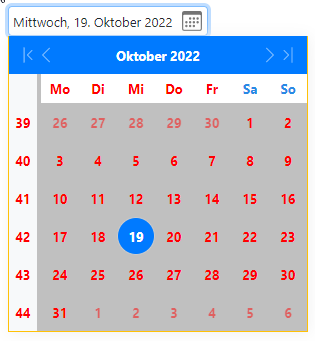
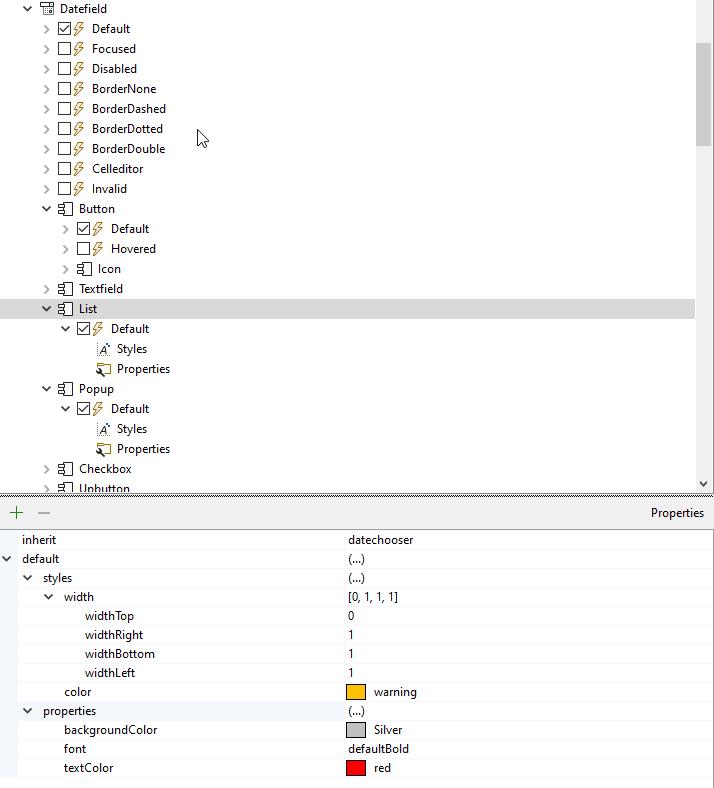
Best regards
Frank
Hi Rupert,
Thank you for posting this issue.
We’re currently looking into this issue and we’ll get back to you ASAP!
Best,
Alaa