

Hi Cristian
Could you indicate us the wisej control that you are animating and the name and event of the animation ?
Regards
Hi Jorge
From your question I understood that you have a value that is not boolean, but you want to checkbox will show it checked and unchecked.
Independent from the database, it’s the datatable or object structure that you populate from database the important stuff.
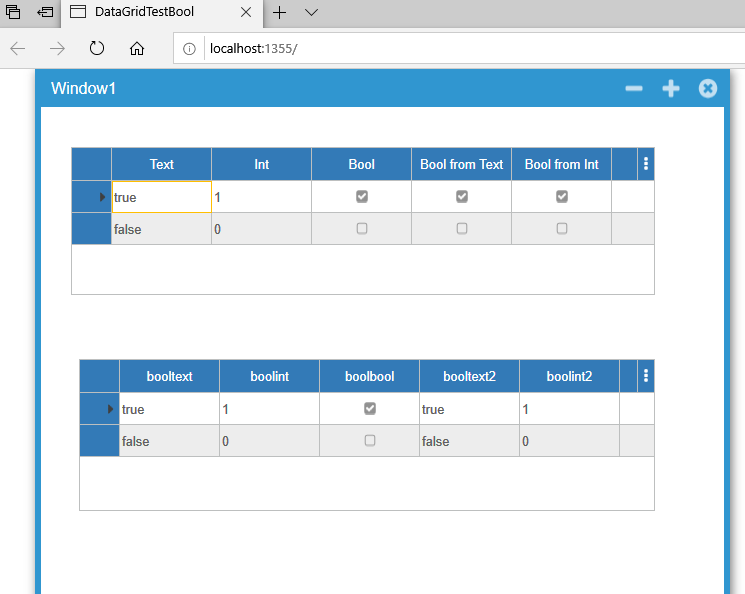
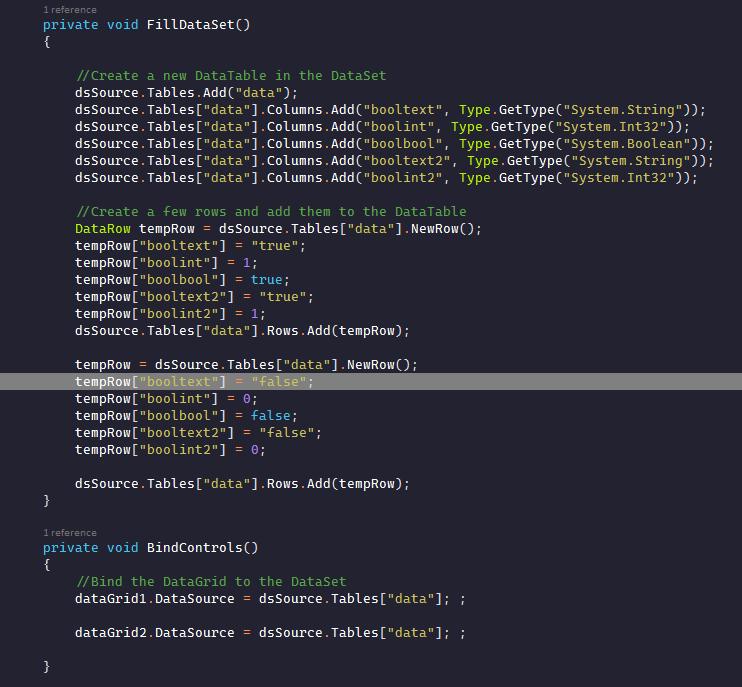
In the sample proyect, I populate a datatable with diferente logical values in diferent datatpyes and used it how datasource for a datagrid with checkbox.
The checkbox take the int and string values how logical and show how checked and unchecked
Datagrid above with custom columns and ckeckbox columns linked with
Datagrid below without columns,
Code for populate DataTabe
I hope helped you
Regards
Paul
Hi Boris
I made a test with the link you provide us
It could be that you have updated your application since you post your query.
I didn’t find any problem with selecting the textbox on screen
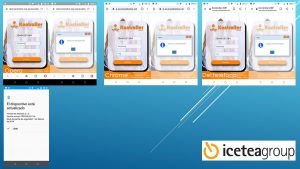
The mobile for the test is a MotoG5, something old ;-), with three browsers, Opera, Chrome and the phone standard
In the picture more details
Regards, Paul
Hi Kirk
A scope to my previous answer
If your goal is to put html tooltip for the datagridview cells, unfortunately this feature is not supported.
Datagridview cells are not rendered as widgets but as HTML with a title attribute interpreted by the browser as the tooltip.
Regards
Hi Kirk
It is possible to apply HTML formatting to the text, with certain restrictions
Here are a couple of examples of how you can do it
Column0.ToolTipText = String.Format(“<font face=\”Microsoft Yahei\” color=\”blue\”>{0}</font>”, “Tooltip Text”);
Column1.ToolTipText = “<b> Bold text</b> Normal text<u> Underlined text </u> <i> Italic Text</i>”;
Regards.